

Postwise
Alternative: Why
Ghosti Wins in 2026
Published · Last updated
We build Ghosti, so take this with a grain of salt. But here is what pushed us to build it in the first place: writing inside a separate dashboard feels like doing homework in a different room from where the conversation is happening. You generate something, copy it, switch tabs, paste it into X, realize the context shifted while you were gone, and start over. Postwise is a well-known AI ghostwriter for X. For creators who like a centralized command center, a dashboard workflow can work. But if you are a solo founder, a creator building in public, or someone who wants to write and reply in the moment, pulling yourself out of the timeline every time you want to post adds friction that kills consistency. That friction is the real problem, and it is worth understanding before picking a tool.
What Actually Drives Growth on X in 2026
The X timeline in 2026 is louder and more crowded than it has ever been. Generic brand updates are dead weight. If your plan is to publish polished announcements and hope the algorithm notices, you will be disappointed. The accounts growing fastest share specific, original perspectives that teach something concrete.
A useful framework for thinking about your content mix is the classic 80/20 rule: eighty percent of your posts teach, share lessons, or offer original takes. Twenty percent promote your product or service. This ratio stops your profile from reading like a continuous ad and positions you as someone worth following for the ideas alone.
But posting original takes is only half the equation. The real compounding engine for most accounts is the reply section.
Why Replies Compound Faster Than Posts
Publishing great posts builds your profile. Replying to other creators builds your network. You cannot expect people to visit your profile if you never show up in theirs. Many growth specialists recommend engaging with 20 or more accounts in your niche daily, and creators who do this consistently tend to observe that growth compounds over weeks and months.
The catch is that reply quality matters enormously. A lazy "great post" does nothing for your visibility. Worse, the X automation rules explicitly prohibit automating mentions or replies on an unsolicited basis, and spammy or duplicative replies can result in account restrictions. Good replies add a counterpoint, share a related experience, ask a sharp follow-up question, or distill a key insight. When you write a thoughtful reply to a prominent account early in its posting window, you often capture attention from everyone else reading that thread.
The problem is time. Finding the right tweets to reply to, reading context, and writing something genuinely valuable for twenty or thirty accounts a day is a serious commitment. This is exactly where an AI writing tool earns its keep, not just by generating posts, but by helping you find and reply to the conversations that matter.
Dashboard Workflow vs. In-Feed Workflow
When you pick an AI ghostwriter, the first real decision is where it lives. Web-app dashboards pull you into a separate interface. You log in, write inside a text editor, maybe schedule some posts, then go back to X to check how things landed. For teams managing multiple clients who need visual scheduling queues and analytics dashboards, this centralized model works well.
For solo creators and founders, though, the dashboard model introduces a specific kind of friction. Every time you want to compose a post or respond to a mention, you leave the timeline, open a new tab, generate text, copy it, switch back, and paste. That context switch disconnects you from the real-time flow of the feed. You miss the trending conversations, the breaking takes, the threads you wanted to jump on while the moment was still hot.
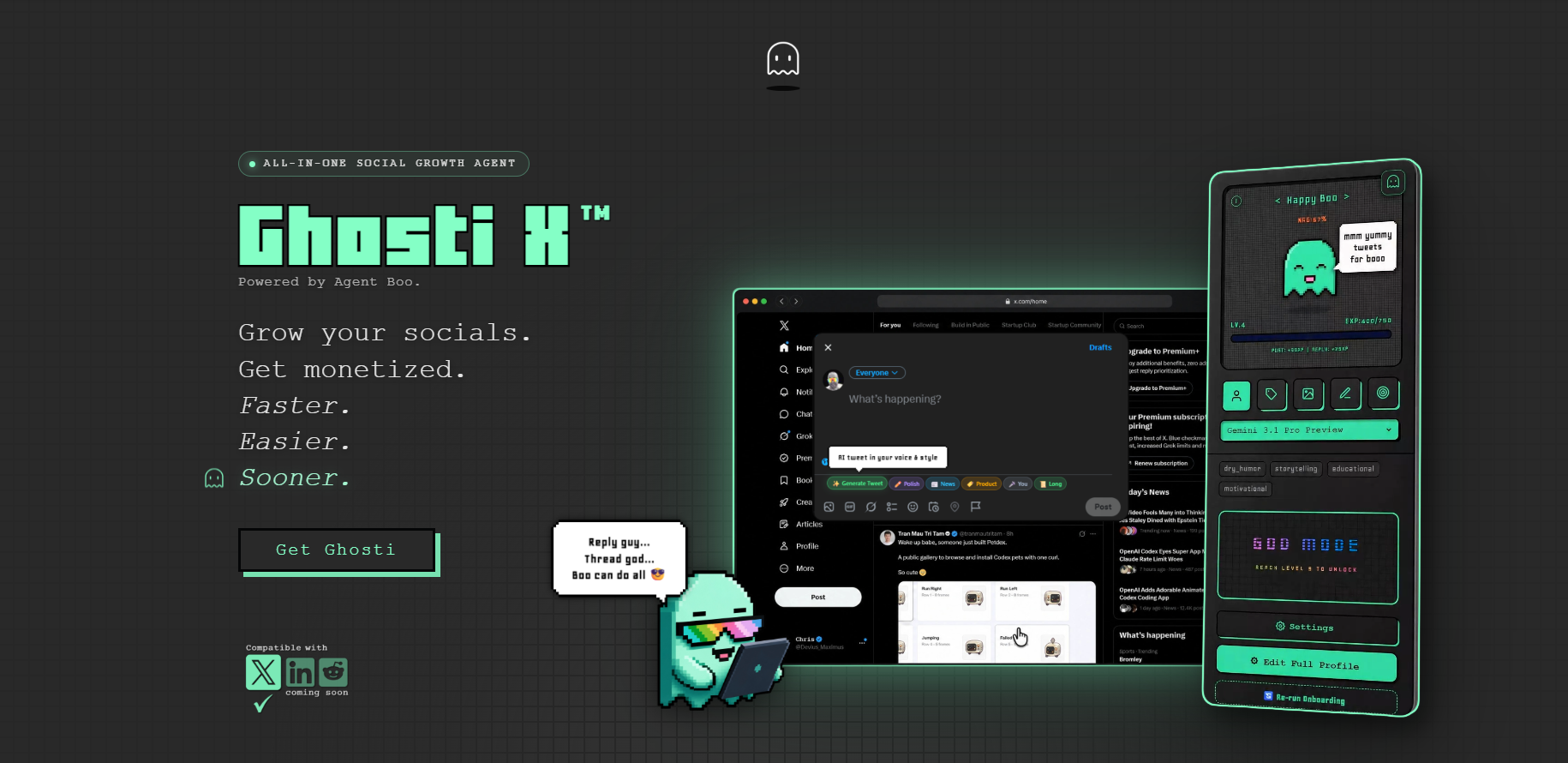
An in-feed extension works the opposite way. It embeds the AI generation tools directly into the X interface, inside the compose box and reply fields. You see a post worth replying to, you generate a context-aware response in one click, and you stay exactly where you are. No tabs. No copy-paste. That immediacy makes it significantly easier to maintain daily engagement habits, because the biggest factor in consistency is reducing the number of steps between "I should post" and actually posting.
Where Ghosti Fits as a Postwise Alternative
Ghosti is a Manifest V3 Chrome extension that generates posts directly inside the X feed. We designed it specifically around the friction problem: if you want to write and engage in the flow of the timeline, you should not have to leave the timeline to do it.
The core of Ghosti is Ghost DNA, a voice-training system that learns from your bio, niche, tone, examples, and custom rules. Instead of pulling from a generic template library, Ghosti generates using the context you provide about who you are and how you communicate. The output sounds like you. For creators who have tried AI writing tools and found the results generic or off-voice, this is the difference that matters most.
For reply-led growth, Ghosti includes Hunt Mode and Reply Guy. Hunt Mode helps you scan and filter the timeline to surface high-opportunity tweets in your niche. Reply Guy reads the context of any post and generates a relevant reply. Together, they turn the daily reply grind into a focused, low-friction activity. You find the conversations worth joining, generate a thoughtful reply, and move on.
Ghosti also includes a full post generator and Thread Studio for building multi-part threads. When you click to generate a post inside the empty X compose box, Ghosti writes using your saved interests, topics, and examples. Threads let you pick the post count and review each part before posting. These are the features that drive daily use, not novelty modes.
On pricing, Ghosti uses a bring-your-own-key model. You plug in an API key from a supported provider and pay that provider directly. The Ghosti license itself is $18.99/month or $49.99/year. You control which model you use and what you spend on usage.
And because consistency is the hardest part of growing on X, Ghosti includes Boo, a pixel-art AI agent that earns XP every time you create content. Boo evolves through nine stages. The progress loop makes showing up feel rewarding instead of like a chore, which is a small thing that makes a surprisingly big difference over months of daily posting.
One more thing worth noting: Ghosti needs no X password and makes no third-party connection to your account. It works inside the browser extension sandbox where you already use X.
Ghosti vs Postwise vs Typefully vs Tweet Hunter: side by side
Here is how Ghosti lines up against Postwise and Typefully and Tweet Hunter on the dimensions that matter for reply-led growth on X. Every competitor fact below comes from the tool's own official site.
| Feature | Ghosti X | Postwise | Typefully | Tweet Hunter |
|---|---|---|---|---|
| Type | Live generation agent | AI ghostwriter for X | Social publishing & scheduling for X | All-in-one AI X growth tool |
| Writes in your voice | ✓ Yes, trained on your examples | ✓ | — | — |
| Generates replies for reply-led growth | ✓ Yes | — | — | — |
| Builds full threads | ✓ Yes, Thread Studio | ✓ | ✓ | ✓ |
| Finds tweets worth replying to | ✓ Yes, Hunt Mode | — | — | — |
| Works inside the X feed | ✓ Yes, native in the feed | — | — | — |
| BYOK — bring your own AI key | ✓ Yes | — | — | — |
| Starting price | $18.99/month | $37 / month (Basic) | — | $49 / month (7-day free trial) |
Postwise is an AI ghostwriter for X that writes in your voice and builds threads. Pricing: $37 / month (Basic).

Typefully is a Social publishing and scheduling for X that builds threads.

Tweet Hunter is an All-in-one AI X growth tool that builds threads. Pricing: $49 / month (7-day free trial).

The takeaway: Ghosti is the pick for creators who want posts, threads, and replies that sound like them, generated in one click right inside X, running on their own AI key.
Choosing the Right AI Ghostwriter for X
Postwise is a well-known AI ghostwriter for X. If you want a centralized dashboard with scheduling and AI writing in one place, and you are comfortable with that workflow, it may serve that job well.
Ghosti is built for a different workflow. If you want your AI writing agent living inside the X feed where you already browse, if you want voice-trained output that sounds like you from the first generation, if you want integrated reply discovery so you can grow through conversations instead of just broadcasting, and if you want to bring your own API key instead of paying for bundled credits, Ghosti is designed for exactly that.
The deciding factors for most creators come down to two things: where you prefer to write (a dashboard or the feed) and how you want to pay for AI (bundled credits or your own key at wholesale cost). If you want to see how in-feed generation feels, you can install Ghosti from the Chrome Web Store and try it with your own API key. For more on growing your presence on X, read our guide on the best tools to grow on X.
Key takeaways
- Workflow friction is the biggest consistency killer. An in-feed AI writing tool removes tab-switching and copy-paste so you stay in the timeline.
- Reply-led growth compounds faster than broadcasting alone. Finding and replying to the right conversations daily is where AI tools provide the most leverage.
- BYOK pricing gives you wholesale AI costs with no daily caps, compared to bundled credit models that meter your usage or gate features by tier.
Frequently asked questions
Does Ghosti work inside X or in a separate app?
Ghosti runs entirely inside the X feed as a Chrome extension. You generate posts directly in the timeline without switching to a separate dashboard or browser tab.
What does BYOK mean for an AI writing tool?
BYOK stands for Bring Your Own Key. Instead of paying for bundled AI credits, you plug in your own API key from a supported provider and pay that provider directly for usage.
Can Ghosti help me find tweets worth replying to?
Yes. Hunt Mode helps you scan and filter the timeline to highlight high-opportunity tweets in your niche. Once you find one, Reply Guy reads the context and generates a relevant reply.
Sources
- X automation rules and policies (accessed June 22, 2026)
- Postwise (official site) (accessed June 22, 2026)
- Typefully (official site) (accessed June 22, 2026)
- Tweet Hunter (official site) (accessed June 22, 2026)
Editorially reviewed by Chris, Ghosti Founder on .