

TweetDeck
Alternative for
X (Twitter) in 2026
Published · Last updated
For many creators and founders, the appeal of TweetDeck was always about speed: spot a conversation worth joining, write something good, post it before the moment passes. As users have looked for alternatives following changes to X's native tooling, most lists point to visual clones that try to recreate the old layout. But the layout was never the point. The point was that tight curation-to-engagement loop that actually grew accounts, and you don't need a multi-column dashboard to rebuild it.
Why TweetDeck worked (it wasn't the columns)
TweetDeck solved two separate jobs at once, and most people blur them together.
The first job was curation. Columns let you split the X firehose into manageable streams. Mentions in one lane, a keyword in another, a competitor list in a third. Your brain could scan spatially instead of scrolling linearly through one algorithmic feed. For founders tracking feature requests, competitor news, and audience conversations simultaneously, this was a genuine productivity gain.
The second job was fast engagement. You spotted a relevant tweet in a monitored column and replied from the same screen. No tab switching, no hunting for the compose box in a different app. That tight loop between seeing an opportunity and acting on it made TweetDeck the default tool for reply-led growth before anyone called it that.
Here's why that matters now: the curation job has partial substitutes built right into X through its own content monitoring tools. But the engagement job (finding the right conversation AND writing a good reply fast) is harder to replace. That gap is what most "TweetDeck alternative" lists ignore. They hand you a scheduling dashboard with a content calendar and call it a day. Scheduling is a different job entirely.
How reply-led growth actually works on X
Before you pick any replacement tool, it helps to understand the strategy that made TweetDeck so effective in the first place. Reply-led growth remains one of the fastest ways to build an audience on X in 2026, and it's the specific workflow most TweetDeck users are trying to recreate.
The logic is simple. When you reply to someone with a larger following, your reply appears in their thread. If it's sharp, useful, or genuinely funny, their audience notices you. A percentage clicks your profile. Some follow. Over weeks and months, consistent high-quality replies compound into real, engaged growth. Current growth guides published this month back the pattern: engaging with 20 or more accounts daily in your niche, combined with consistent posting, drives growth (growth specialists, 2026).
But the bottleneck is almost never finding tweets to reply to. Scroll for five minutes and you'll find plenty. The bottleneck is writing something worth posting once you find them. You stare at the compose box, type something generic, delete it, try again, eventually move on. Multiply that friction by thirty replies a day and you understand why most people burn out within a week.
TweetDeck solved the first half of the friction (finding tweets via columns). It never solved the second half (writing the reply). That's why so many people lost momentum even when TweetDeck was free and fully functional. The ideal replacement would solve both halves: surface the opportunities AND help you write the response, fast, in your own voice.
This is also why scheduling suites are a poor fit for the TweetDeck workflow. Scheduling tools are designed for broadcast content you've already written and queued in advance. Reply-led growth is real-time and conversational (growth specialists, 2026). You can't schedule replies three days early to a conversation that hasn't happened yet. You need to be in the feed, in the moment, writing something relevant to a live thread.
Ghosti vs Typefully vs Tweet Hunter: side by side
Here is how Ghosti lines up against Typefully and Tweet Hunter on the dimensions that matter for reply-led growth on X. Every competitor fact below comes from the tool's own official site.
| Feature | Ghosti X | Typefully | Tweet Hunter |
|---|---|---|---|
| Type | Live generation agent | Social publishing & scheduling for X | All-in-one AI X growth tool |
| Writes in your voice | ✓ Yes, trained on your examples | — | — |
| Generates replies for reply-led growth | ✓ Yes | — | — |
| Builds full threads | ✓ Yes, Thread Studio | ✓ | ✓ |
| Finds tweets worth replying to | ✓ Yes, Hunt Mode | — | — |
| Works inside the X feed | ✓ Yes, native in the feed | — | — |
| BYOK — bring your own AI key | ✓ Yes | — | — |
| Starting price | $18.99/month | — | $49 / month (7-day free trial) |
Typefully is a Social publishing and scheduling for X that builds threads.

Tweet Hunter is an All-in-one AI X growth tool that builds threads. Pricing: $49 / month (7-day free trial).

The takeaway: Ghosti is the pick for creators who want posts, threads, and replies that sound like them, generated in one click right inside X, running on their own AI key.
How Ghosti replaces the TweetDeck workflow
We build Ghosti, so take our recommendation with that context. But here's why we think it fills the TweetDeck-shaped hole better than a scheduling dashboard does.
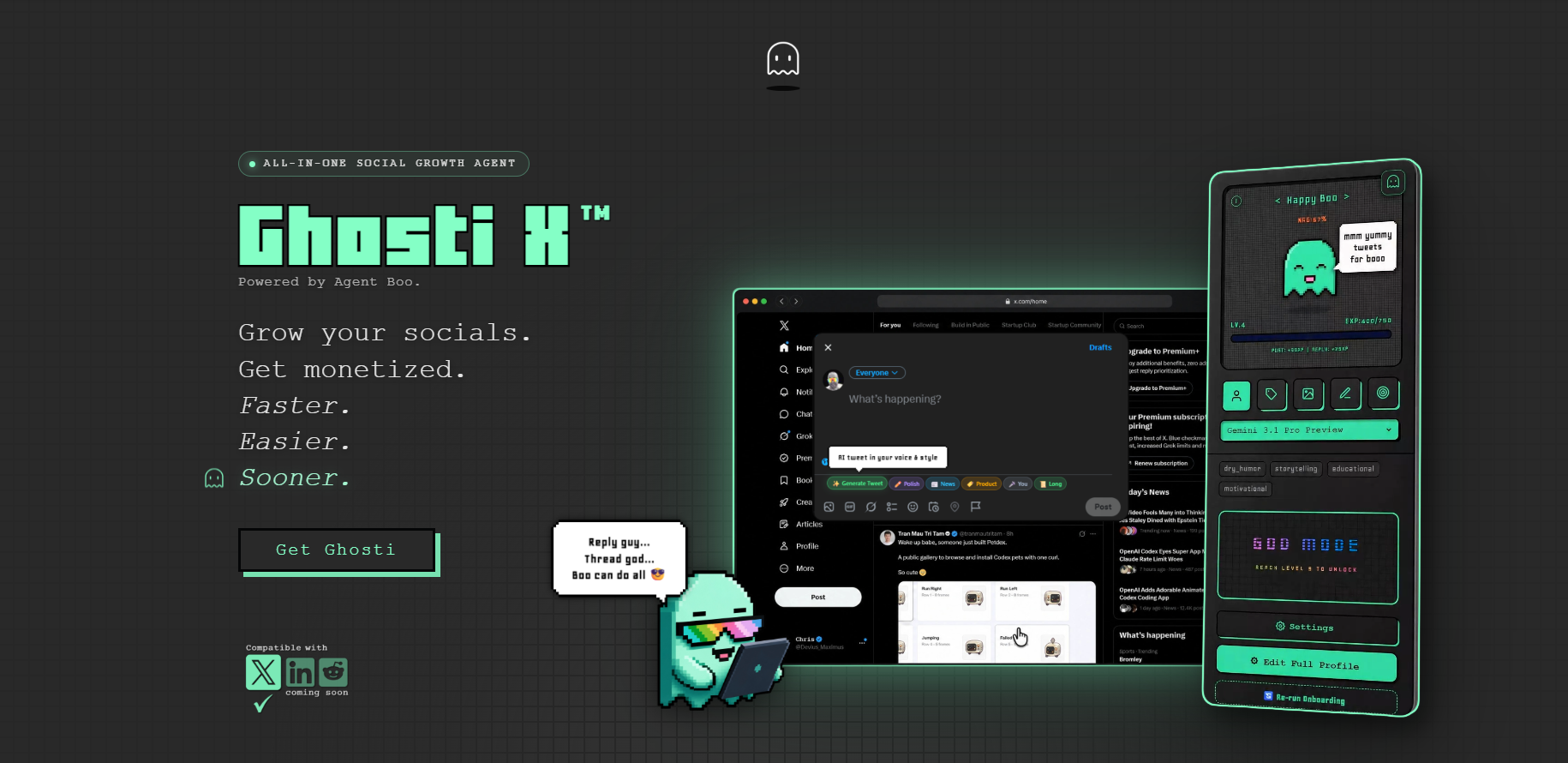
Ghosti is a Chrome extension that lives inside the X feed. No separate tab, no external dashboard, no copy-paste loop. That alone replicates the spatial immediacy that made TweetDeck feel fast.
Hunt Mode handles the curation job. It surfaces tweets worth replying to based on your niche and interests, working like a filtered, intelligent column. Instead of monitoring five static keyword streams, you get a curated set of high-opportunity conversations. For the specific use case of "find relevant tweets and jump in," it's a more focused tool than a generic column layout ever was.
Reply Guy solves the writing bottleneck that TweetDeck never touched. Hit the button, Ghosti reads the tweet's context, and generates a draft reply for you to review and edit before posting. That tight spot-and-reply loop is exactly what TweetDeck users lost, except now the compose box isn't blank anymore.
The voice quality is where it gets interesting. Ghost DNA learns from your examples, tone, topics, and custom rules. It doesn't produce generic AI replies that read like every other account on the platform. Your replies sound like you typed them yourself. On a platform where authenticity drives engagement, that's the difference between a reply that gets scrolled past and one that starts a real conversation.
Ghosti also generates standalone posts and full threads. Thread Studio turns a topic into a multi-part thread. The post generator creates content from your saved interests and examples. These are primary features, and they cover the content creation side that TweetDeck never attempted.
The Ghosti license runs $18.99/month or $49.99/year (ghostiapp.com). No per-day generation caps, no AI features locked behind a higher pricing tier.
Ghosti also needs no X password and makes no third-party connection to your account. It works as a browser extension alongside the native X interface you're already using.
One feature that sounds minor until you try it: Boo, the pixel-art agent in your sidebar, earns XP every time you create content. Boo evolves through nine stages, and neglecting it lets progress slip. It turns the grind of consistent posting into a visible progress loop. For creators who struggle with showing up daily, it works surprisingly well.
Picking the right TweetDeck replacement
Not every TweetDeck user needs the same tool.
If your primary need is scheduling posts across multiple platforms (X, LinkedIn, Instagram, Facebook), a full scheduling suite handles that. Those tools are purpose-built for content calendars, team approvals, and cross-network publishing. See the comparison above for how they stack up.
If your primary need is engagement, replies, and content creation inside X, that's where Ghosti fits. Hunt Mode replaces keyword monitoring. Reply Guy and the post generator replace the blank compose box. Ghost DNA keeps everything sounding like you. And it all happens inside the feed, with no dashboard to context-switch into.
Most creators who relied on TweetDeck were in the second camp. They weren't scheduling a content calendar two weeks out. They were sitting in the feed, watching for opportunities, and jumping into conversations. That's the workflow Ghosti was built to handle. Grab it from the Chrome Web Store and try rebuilding your old TweetDeck workflow inside the native feed. You might find you don't miss the columns at all.
Key takeaways
- TweetDeck's real value was speed, spotting a conversation and replying before the moment passed; Ghosti keeps that speed but inside the X feed.
- Ghosti generates posts, threads, and replies right in the X feed, so there is no separate dashboard or column setup to maintain.
- Ghost DNA trains on your own writing, so replies sound like you rather than generic AI.
- Hunt Mode surfaces tweets worth replying to and drafts the reply in your voice, the reply-led growth TweetDeck never helped with.
- Ghosti is BYOK: bring your own API key and pay the model provider directly, with no AI markup.
Frequently asked questions
Is there a free TweetDeck alternative in 2026?
X's native features like lists and bookmarks can partially substitute some of TweetDeck's curation workflow. For the engagement and content creation side, most capable tools require a subscription. Ghosti keeps costs low since you pay only for AI usage on your own API key, plus the extension license starting at $49.99/year.
Are there any open source TweetDeck alternatives?
Community-built alternatives surface from time to time, but for a reliable daily workflow, a maintained tool with active development tends to be more practical than a project that may not keep pace with frequent platform changes.
What is the best TweetDeck alternative in 2026?
If you mainly used TweetDeck to spot conversations and reply fast, Ghosti is the closest replacement. It generates on-voice posts and replies directly inside the X feed, so you keep the speed without managing columns or switching to a separate dashboard.
Can Ghosti fully replace the TweetDeck workflow?
Ghosti covers the writing side of that workflow, drafting posts, threads, and replies in your voice right in the feed. If you also relied on multi-column monitoring or a scheduling queue, you would pair it with a dedicated scheduler; the comparison above shows which tool fits which job.
Sources
- X Automation Rules, X Help Center (accessed June 23, 2026)
- Typefully (official site) (accessed June 23, 2026)
- Tweet Hunter (official site) (accessed June 23, 2026)
Editorially reviewed by Chris, Ghosti Founder on .